Wednesday, September 1, 2021

Windows Server 2022 is now available with new security features

Today, Microsoft is releasing Windows Server 2022, making it generally available to customers around the world. Typically, Windows Server releases are somewhat aligned with consumer versions of Windows, but Windows Server 2022 is still more like Windows 10 than Windows 11. That’s probably because the use cases for Windows Server don’t really require the kind of UI refresh that Windows 11 is.

Instead, this release focuses on enhancing core features that are more important for servers. First, there are security improvements with what Microsoft calls “advanced multi-layered security”. There are two parts to this; first, there’s Secured-core Server, a type of device where Microsoft works with hardware partners to enable new hardware, firmware, and driver features to provide enhanced security.  Microsoft did something similar for business PCs, which it called Secured-core PCs, and this is taking that to servers.

Additionally, Windows Server 2022 improves the speed and security of network connections with HTTPS and TLS 1.3 enabled by default, and support for DNS-over-HTTPS is also available now. AES-256 encryption support is now available for the SMB protocol, too.

Windows Server 2022 also comes with some new Azure features, like Azure Arc, which enables cloud services for on-premises configurations. Plus, there’s support for SMB Compression and an updated Windows Admin Center with an improved server management experience. Microsoft also highlighted some Azure features released over the past year, such as Azure Automanage to automate best practices for the cloud, Azure Kubernetes Service with .NET support, and more.

This release of Windows Server adds support for 48TB of RAM as well as 2,048 logical cores across 64 CPU sockets, which should enable support for even more applications. Additionally, it includes improved application support for Windows containers, adds support for IPv6 and dual-stack networking, and more.

If you’re interested in Windows Server 2022, you can head here to try it out, and find the full list of new features here. To buy it, there are three pricing options available; Essentials is designed for specialty servers and is licensed per server, while Standard and Datacenter are licensed per core and meant for large-scale applications.

The post Windows Server 2022 is now available with new security features appeared first on xda-developers.

Samsung Galaxy Watch 4 Classic vs Samsung Galaxy Watch 3: Which smartwatch should you buy?

Samsung has launched its latest wearables as part of the Galaxy Watch 4 series and these include the Galaxy Watch 4 and the Galaxy Watch 4 Classic. These are the first two smartwatches that come with the latest version of WearOS, albeit with a custom UI on top called OneUI Watch. It’s not just about the software though. The Galaxy Watch 4 brings a host of improvements compared to the previous generation of the Galaxy Watch even in terms of hardware.

Galaxy Watch 4 Classic on a wrist

While the standard Galaxy Watch replaces the Galaxy Watch Active 2, the Galaxy Watch 4 Classic is a successor to the Galaxy Watch 3 from last year. If you’re wondering whether you should upgrade to the new smartwatch from Samsung or if you’re planning to get a new one and wondering to get the latest watch or to get the older one on a sweet discount, we’re here to help you out with that decision.

Samsung Galaxy Watch 4 Classic vs Samsung Galaxy Watch 3 Specs

Samsung Galaxy Watch 4 Classic vs Samsung Galaxy Watch 3: Specifications

Specification Samsung Galaxy Watch 4 Classic Samsung Galaxy Watch 3
Size(s)
  • 42mm
  • 46mm
  • 41mm
  • 45mm
Dimensions and Weight
  • 42mm: 41.5×41.5×11.2mm, 46.5g
  • 46mm: 45.5×45.5×11.0mm, 52g
  • Stainless steel case
  • 41mm: 41.0×42.5×11.3mm, 48g
  • 45mm: 45.0×46.2×11.1mm, 53g
Display
  • 42mm: 1.19-inch (330PPI)
  • 46mm: 1.36-inch (330PPI)
  • 41mm: 1.2-inch
  • 45mm: 1.4-inch
Processor Exynos W920 (5nm) Exynos 9110 (10nm)
Memory
  • 1.5GB RAM
  • 16GB Internal Storage
  • 1GB RAM
  • 8GB Internal Storage
Battery
  • 42mm: 247mAh
  • 46mm: 361mAh
  • 41mm: 247mAh
  • 45mm: 340mAh
Sensors Accelerometer, Barometer, Gyro, Geomagnetic, Light, Samsung BioActive Sensor Accelerometer, Barometer, Gyro, ECG, Light, PPG
Connectivity LTE, Bluetooth 5.0, Wi-Fi 802.11 a/b/g/n 2.4+5GHz, NFC, GPS/Glonass/Beidou/Gallileo LTE, Bluetooth 5.0, Wi-Fi 802.11 a/b/g/n 2.4+5GHz, NFC, GPS/Glonass/Beidou/Gallileo
Durability
  • 5ATM water-resistant
  • IP68
  • MIL-STD-810G
  • 5ATM water-resistant
  • IP68
  • MIL-STD-810G
OS OneUI Watch Tizen OS

Hardware: Improvements all over

Galaxy Watch 4 Classic and Watch 4

The new Galaxy Watch 4 Classic gets newer and better hardware both on the inside and the outside compared to the Galaxy Watch 3 from last year. The design is slightly updated and looks more formal and classy on the Watch 4 Classic. On the inside, the Galaxy Watch 4 Classic is powered by the latest Exynos W920 chipset which is based on a 5nm manufacturing process. This chip is much faster and more power-efficient compared to the Exynos 9110 on the Galaxy Watch 3.

The Galaxy Watch 4 Classic also gets more RAM and storage, 1.5GB and 16GB instead of 1GB and 8GB on the Galaxy Watch 3. More RAM helps with smoother performance and more storage means you can now install more apps and store more songs and podcasts offline on your watch. The power-efficient chip means that with almost the same capacity battery on both watches, the Galaxy Watch 4 Classic will give you better battery life.

Galaxy Watch 4 classic

The overall size of the dial is slightly larger on the Galaxy Watch 4 Classic but the chassis is thinner compared to the Galaxy Watch 3. This is mainly because Samsung’s new BioActive Sensor combines all vital sensors required for health tracking into one unit instead of having multiple different sensors contributing to the thickness of the watch.

Health Features

Galaxy Watch 4 and Watch 4 Classic on a wrist

Thanks to the new BioActive Sensor we just talked about, the Galaxy Watch 4 Classic brings new health features to the table. While the Galaxy Watch 3 could measure heart rate, SpO2, and even ECG, the new Galaxy Watch 4 Classic takes it up a notch and has the ability to perform a Bioelectrical Impedance Analysis or BIA. This is used to measure body composition or in simple terms, track your BMI, muscle fat, water content, visceral fat, etc. The Galaxy Watch 4 is one of the first smartwatches to do so and is definitely a bonus for anyone who is serious about their health tracking.

Software: The latest version of Wear OS is finally here, kind of

Galaxy Watch 4 with Google apps

When Google announced it was partnering with Samsung to give Wear OS a much-needed overhaul, all of us were excited to see what was coming. The Galaxy Watch 4 and Watch 4 Classic are the first smartwatches to come with the latest version of Wear OS, but with a host of add-ons from Samsung. Samsung has been using Tizen on their smartwatches and while it helped with a smoother UI and better battery performance when compared to earlier versions of Wear OS, it was lacking in the features department.

You could only use Samsung’s apps and a few third-party apps on Tizen whereas you can now download countless apps from the Google Play Store, thanks to the integration with Wear OS. Samsung, however, has heavily modified the UI and is calling it OneUI Watch. Of course, you can use the Galaxy Watch 4 with any Android device that comes with GMS core (sorry, Huawei users) but it works best with Samsung’s phones since a lot of the stock apps are Samsung’s own apps instead of Google’s and some functions are also exclusive to Samsung Galaxy smartphones. Oh, and the new Galaxy Watch 4 Classic also doesn’t work with iOS devices.

Verdict: Which one should you buy?

Galaxy Watch 4 Classic on top of its box

The answer is pretty obvious at this point. The Samsung Galaxy Watch 4 Classic is overall a better smartwatch in probably every single aspect. The Galaxy Watch 3 is also a good smartwatch, but the older CPU and limitations of Tizen OS are where it loses out in comparison to the new Galaxy Watch 4 Classic. If you’re on a strict budget though, you can still get a Galaxy Watch 3 if you don’t really use a lot of third-party apps on your watch and you mainly want a wearable for fitness tracking. Prior to the Watch 4 coming out, the Galaxy Watch 3 was widely regarded as one of the better smartwatch options around for Android users.

As of writing, both the Galaxy Watch 4 Classic and the Galaxy Watch 3 are retailing for the same price of $349 on Samsung’s website which seems weird and in such a scenario, there’s no doubt you should pick up the Galaxy Watch 4 Classic. If you can find a good deal on the Galaxy Watch 3 a few months down the line, you can still consider getting one with a sweet discount.

    Samsung Galaxy Watch 4 Classic
    The Samsung Galaxy Watch 4 has a new BioActive sensor, and a new unified software platform called One UI Watch.
    Samsung Galaxy Watch 3
    The Galaxy Watch 3 runs on Tizen OS and an older chip but if you find a good deal, it can still be a decent option.

If you’re an Android user, you’ve surely been longing for a good smartwatch that can compete against the Apple Watch, and looks like Samsung finally has a winner. If you want to know how the Galaxy Watch 4 Classic compares to the Apple Watch Series 6, we have a dedicated comparison highlighting the differences between both watches. In case you decide to pick up the Samsung Galaxy Watch 4, we also have a list of the best bands for the Galaxy Watch 4, so you can choose something that better matches your style.

The post Samsung Galaxy Watch 4 Classic vs Samsung Galaxy Watch 3: Which smartwatch should you buy? appeared first on xda-developers.

Scrape Search Engine Results in Real-time with Zenserp

If you have a project or service that requires scraping search results for data, you might be interested in this API that can streamline the process. Zenserp is able to get real-time data from search results on the major search platforms. Their simple API has scalable options that make it a great solution for any sized project. You can try Zenserp for free, to see how powerful this API is.

Zenserp works with the following platforms:

  • Google
  • Bing
  • Yahoo
  • DuckDuckGo

Get detailed scrape results from APIs for specific situations. You can scrape Youtube results with the Youtube Search API, to get the latest information on video rankings for a specific search. If you need to monitor shopping results, use the Google Shopping Product Page API to gain valuable product insights and scrape product information. The Google Trends API will help you retrieve trending topics in easy-to-read JSON-format. You can also take advantage of the Google Search API for standard search, image search, news search, maps search, news search, etc.

Included Google APIs:

  • Google SERP API
  • Google Image Search API
  • Google Maps Search API
  • Google News API
  • Google Trends API
  • Google Shopping API
  • Reverse Image Search API
  • Youtube Search API

With these extensive tools, Zenserp becomes an all-in-one solution for your search scrape needs. Their API is easy to use and contains many different parameters that help you get exactly the data you’re looking for. You can try a free demo that lets you test these scraping features here.


Generous Free Plan

Zenserp believes in fair pricing. That’s why they offer you 50 API requests per month for free. No strings attached!

Request Builder

Getting started is easy. Zenserp provides an extensive request builder, that converts your requests into production-ready code snippets.

Supports All Programming Languages

Zenserp can be used with any programming language, as data can be simply retrieved by any HTTP client.


A Full Coverage Solution

Your SERP results will give you more than just organic and paid results. All snippet types are included with new ones being added regularly. If a search engine creates a new type of snippet, Zenserp will update its API to include it. If you want to see a full list of their current supported SERP snippets, see this documentation here.

You can start using Zenserp at no cost, with 50 free requests. This is a great way to try out the API and see if it’s going to work for your specific situation. If you find that this is a good solution, you can upgrade to one of their paid plans, which offers features for a project of any size.

Get Zenserp here
We thank Zenserp for sponsoring this post. Our sponsors help us pay for the many costs associated with running XDA, including server costs, full time developers, news writers, and much more. While you might see sponsored content (which will always be labeled as such) alongside Portal content, the Portal team is in no way responsible for these posts. Sponsored content, advertising and XDA Depot are managed by a separate team entirely. XDA will never compromise its journalistic integrity by accepting money to write favorably about a company, or alter our opinions or views in any way. Our opinion cannot be bought.

The post Scrape Search Engine Results in Real-time with Zenserp appeared first on xda-developers.

Google could launch custom CPUs for Chromebooks in 2023

Google recently teased that its upcoming Pixel 6 and 6 Pro will feature a custom-made CPU called Google Tensor. This will be the first time the company designs its own processors and moves away from Qualcomm. But the plans apparently don’t stop there, as Google is also readying custom CPUs to power Chrome OS-based laptops and tablets. According to a report by Nikkei Asia, we could see Chromebooks launch with custom Google CPUs as early as 2023.

The idea that Google is working on in-house processors for Chromebooks isn’t completely new. Back in April, initial reports came out about Google building custom CPUs for phones, tablets, and laptops. Sure enough, we saw part of that materialize when Google teased the Pixel 6 family a couple of weeks ago. If that’s any indication, there was already a good chance we’d see custom Google CPUs for Chromebooks at some point, too.

According to Nikkei‘s sources, Google’s transition to custom CPUs for laptops and tablets was inspired by Apple, which began a similar transition last year. After using Intel CPUs for over a decade, the Cupertino company began switching to Apple Silicon, starting with the Apple M1 that’s now inside the MacBook Air, the iPad Pro, the 24-inch Mac, and more. Devices with this new processor have proved successful, so Google wants to try something similar.

Much like Apple Silicon, Google’s custom processors will be based on technology from Arm, thanks to the company’s fairly open licensing scheme. Arm-based processors power pretty much every smartphone out there, and now, some PCs, too.

Custom processors like these are desirable for differentiation. For example, with the Pixel 6, Google’s Tensor processor is specifically designed to handle computational photography even better with AI processing, as well as things like HDR video. Plus, it’s also improving voice recognition, real-time translation, and more. The company can build a chipset that’s more tailored to the needs of their devices, which (hopefully) means more compelling products.

Of course, we have yet to see just how well the transition to custom CPUs turns out for Google, be it on Chromebooks or phones. We still don’t know everything about the Pixel 6, not even a release date we can look forward to. That will be the first time we can judge Google’s ability to design chips that offer a better experience on its devices. Then we’ll have to wait a while longer to see if they can do the same for laptops.

The post Google could launch custom CPUs for Chromebooks in 2023 appeared first on xda-developers.

Samsung Galaxy Z Flip 3 vs Samsung Galaxy S21 Ultra: To fold or not to fold, that is the question

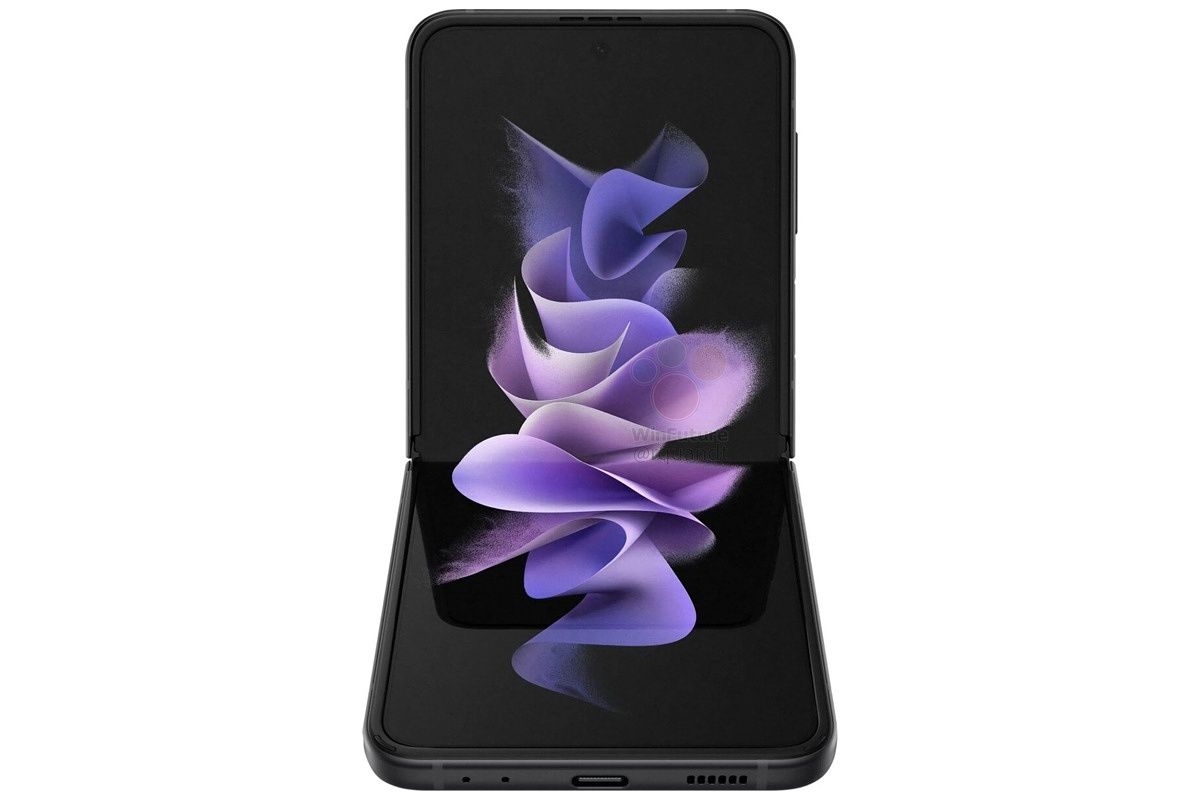
Samsung’s Galaxy Z Flip 3 is now official, and if you’re planning to upgrade to a new Samsung phone, you’ve got some decisions to make. If you want the best, there’s actually a lot to choose from, including the brand-new Galaxy Z Fold 3, Galaxy Z Flip 3, and Galaxy S21 Ultra. As you can probably guess, each one has its own unique advantages. As is always the case with consumer technology, there’s no one-size-fits-all solution.

When you’re looking at the Samsung Galaxy Z Flip 3 vs the Samsung Galaxy S21 Ultra, there are two main priorities you need to consider.

  • Do you want a phone that folds into something more compact?
  • Do you want the latest and greatest smartphone camera technology?

Samsung Galaxy Z Flip 3 and S21 Ultra Specs

Samsung Galaxy Z Flip 3 vs Galaxy S21 Ultra: Specifications

Samsung Galaxy Z Flip 3 Samsung Galaxy S21 Ultra
CPU 5nm 64-bit Octa-Core Processor (2.84GHz + 2.4GHz + 1.8GHz) 5nm 64-bit Octa-Core Processor (2.8GHz + 2.4GHz + 1.8GHz)
Body Folded: 72.2×86.4×17.1mm
Unfolded: 72.2x166x6.9mm
Weight: 183g
165.1×75.6×8.9mm
Weight: 227g
Display Main screen: 6.7-inch FHD+ Dynamic AMOLED 2X Display (22:9)
Infinity Flex Display 2,640×1,080, 425ppi, 120Hz adaptive refresh rate
Cover screen: 1.9-inch Super AMOLED Display 260×512, 302ppi
6.8-inch Quad HD+ Dynamic AMOLED 2X
Infinity-O Display (3,200×1,440), 515ppi, 120Hz refresh rate
Camera 12MP f/1.8 wide (OIS, Dual Pixel AF) + 12MP f/2.2 ultra-wide
Front: 10MP f/2.4
108MP f/1.8 wide (1/1.33in, PDAF, OIS) + 12MP f/2.2 ultra-wide (Super Speed Dual Pixel AF) + 10MP f/2.4 3x telephoto (Dual Pixel AF) + 10MP f/4.9 10x telephoto (Dual Pixel AF)
Front: 40MP f/2.2
Memory 8GB RAM, 128GB/256GB UFS 3.1 storage 16GB RAM (LPDDR5) with 512GB internal storage
12GB RAM (LPDDR5) with 256GB internal storage
12GB RAM (LPDDR5) with 128GB internal storage
Battery 3,300mAh dual battery 5,000mAh
Network LTE: Enhanced 4X4 MIMO, 7CA, LAA, LTE Cat. 20
5G: Non-Standalone (NSA), Standalone (SA), Sub6 / mmWave
Water Resistance IPX8 IP68
Sensors Capacitive fingerprint sensor (side), Accelerometer, Barometer, Gyro sensor, Geomagnetic sensor, Hall sensor (analog), Proximity sensor, Light sensor Ultrasonic Fingerprint sensor, Accelerometer, Barometer, Gyro sensor, Geomagnetic sensor, Hall sensor, Proximity sensor, Ambient Light sensor
OS Android 11
Colors Cream, Green, Lavender, Phantom Black, Gray, White, Pink Phantom Black, Phantom Silver, Phantom Titanium, Phantom Navy, Phantom Brown
Price Starts at $999.99 Starts at $1,199.99

Samsung Galaxy Z Flip 3 vs Galaxy S21 Ultra: Design and Display

With the Galaxy Z Flip 3, the key-value indicator is you can fold it in half, making it more compact. Indeed, that’s the whole point of the device. With the original Galaxy Fold, the idea was to take a regular phone-sized device and unfold it into something larger. With the Galaxy Z Flip, you’d take a similarly-sized device and fold it down to something smaller.

Samsung Galaxy S21 Ultra on table next to partially folded Galaxy Z Flip 3

The main screen hasn’t changed on the Galaxy Z Flip 3, but the external screen has, and it’s bigger. The external screen is now 1.9 inches instead of 1.1 inches, maintaining a similar 302ppi pixel density. This is for a quick view of the time, notifications, and so on.

The main screen is 6.7 inches with a 2,640 x 1,080 resolution, giving it a very tall 22:9 aspect ratio. The screen on the Galaxy S21 Ultra is actually much bigger, coming in at 6.8 inches with a 20:9 aspect ratio. Remember, screen sizes are measured diagonally, and as the aspect ratio gets closer to being square, the more surface area there is with the same diagonal size. A difference of 0.1 inches is more than it sounds like in this case.

It’s also got a higher resolution, coming in at 3,200 x 1,440, although they both offer 120Hz refresh rates. The pixel density on the S21 Ultra is 515ppi, compared to 425ppi on the Galaxy Z Flip 3.

When looking at the screen in this comparison, the Galaxy S21 Ultra is the better one. That’s as it should be too. When you stick to an industry standard that’s been used for 15 years — meaning a rectangular device — it’s easy to make the rest of it the best possible. On the other hand, the Galaxy Z Flip has a form factor that might win you over.

Front displays of Samsung Galaxy S21 Ultra and Galaxy Z Flip 3

Let’s talk about the design too though, because the Samsung Galaxy Z Flip 3 is lighter, and when opened, it’s thinner. It comes in at 183g, which is 44g lighter than the Galaxy S21 Ultra. The fact it’s lighter fits in with the idea of it being more compact. It’s just easier to carry around. While the Galaxy S21 Ultra has held its ground as one of the best smartphones on the market, it must be considered that it’s fairly big, bulky, and heavy. Most people find that impractical for daily, prolonged use.

The Galaxy Z Flip is 17.1mm thick when folded, however, while the Galaxy S21 Ultra is 8.9mm. Keep in mind the dimensions of the Z Fold 3 are 72.2 x 86.4mm when it’s folded, while the dimensions of the Galaxy S21 Ultra are 165.1 x 75.6mm. That means if you have smaller pockets or bags that you carry a device in, the Galaxy Z Flip 3 is the way to go.

Samsung Galaxy Z Flip 3 vs Galaxy S21 Ultra: Camera

All of the Samsung Galaxy S21 series was pretty great, but one thing made the Galaxy S21 Ultra really stand out from the pack, and indeed the rest of the market. I’m talking about the camera. The hardware on the Galaxy S21 Ultra camera is some of the best around, and no, the Galaxy Z Flip 3 doesn’t even come close.

But before we look at specs, let’s keep in mind it’s not supposed to come close. The Samsung Galaxy S21 Ultra camera is what I’d call an enthusiast camera. It’s for people that want the best of the best, and you don’t need to come close to it in order to have a phenomenal camera experience.

Samsung Galaxy S21 Ultra next to Galaxy Z Flip 3, showing the back

The Samsung Galaxy S21 Ultra has a 108MP f/1.8 1/1.33-inch main sensor. That’s about as good as it gets. The larger sensor means it lets in a lot of light for great low-light performance. On top of that, the 108MP resolution uses 9:1 pixel binning for even better low-light performance in a 12MP image.

That’s not all though, because it has both a 3x and a 10x telephoto lens. Think of it this way. If you have a single lens on your camera, it can see a specific field of view, and that field of view is divided into a specific amount of pixels. If you digitally zoom in with that lens, the effect — aside from some software tricks — is essentially the same as if you took the picture without zooming at all, and you simply cropped it.

With dedicated zoom lenses, you’re pretty much using something that has a smaller field of view, but a similar resolution. This allows for lossless zoom at those ranges. There are other issues this presents, such as the telephoto lens not working as well in low light, since it’s smaller by definition, but there are software tricks for that too.

With a 3x zoom and a 10x zoom lens, this opens up a lot of possibilities, the least of which is 10x lossless zoom. But those lenses can work together to do some cool things. Of course, the higher you go, the more loss you’ll see. The camera actually goes up to 100x, although you probably wouldn’t want to use it like that.

Now that we’ve talked about the capabilities of the Galaxy S21 Ultra, let’s talk about the Samsung Galaxy Z Flip 3. It’s just got two 12MP sensors, the main one of which also has an f/1.8 aperture. It’s a fine camera, although way more mainstream. In fact, even compared to high-end cameras, there’s still no telephoto lens. If you’re looking for a camera that will get the job done for social media and family photos, this will do that very well. But there’s not as much overhead room to play here, as the bells and whistles from the Ultra are missing here.

Finally, they both have 12MP f/2.2 ultra-wide sensors, which seem to be the same across the board.

Conclusion: Which one should you get?

Like I said earlier, both of these are great phones in their own way. There’s no simple, one-size-fits-all solution where I can say one is better than the other. But we’re back to where we started. Are you looking for a screen that can fold, or are you looking for the latest and greatest in smartphone camera technology?

Samsung Galaxy S21 Ultra next to Galaxy Z Flip 3, showing the back

The Samsung Galaxy Z Flip 3 is all about having a compact device. If you’re looking for something that won’t take up a lot of space in your pocket, look no further. In fact, if you’re not looking for that compact form factor, you’d probably be better off with the Samsung Galaxy Z Fold 3. It also comes in prettier colors, including Cream, Green, Lavender, Phantom Black, Gray, White, and Pink, so it’s more fun. The main colors of the Samsung Galaxy S21 Ultra are Phantom Black and Phantom Silver, although there are some exclusive colors if you buy directly from Samsung.com.

    Samsung Galaxy Z Flip 3
    The Samsung Galaxy Z Flip 3 takes the flip phone form factor and takes it to the next level.

The Samsung Galaxy S21 Ultra is really what you’d get if you want the top-end camera. If you want the traditional form factor without needing this camera, you can go for something like an S21 or an S21+.

    Samsung Galaxy S21 Ultra
    The Samsung Galaxy S21 Ultra is known for its camera chops, but it has it all.

As far as performance goes, both of these devices are the same. Pricing is technically a bit higher on the Galaxy S21 Ultra, but you can usually find deals that mark it down to about the same as the Galaxy Z Flip 3.

In other words, it’s all pretty simple. You just have to break it down to which of the two key-value indicators you want.

If you decide on a Samsung Galaxy Z Flip 3, you can find the best deals here, or you can pick up a case here.

The post Samsung Galaxy Z Flip 3 vs Samsung Galaxy S21 Ultra: To fold or not to fold, that is the question appeared first on xda-developers.

Nintendo Switch Online may be adding Game Boy games

There’s a rumor in the gaming industry that Nintendo may soon bring another of its extensive libraries to Nintendo Switch Online subscribers — specifically, the libraries of the Game Boy and the Game Boy Color. There’s a chance this could be a gateway to bring other Nintendo gameplay libraries to the Switch… at least, so one hopes.

This rumor was first mentioned on the “Nate the Hate” podcast by insider “NateDrake.” Up to now, Nintendo has reserved the Switch Online library of free games for NES and SNES titles. However, in 2019, a dataminer called OatmealDome discovered that there are four emulators referenced in the Nintendo Switch Online app, codenamed “Kachikachi, Canoe, Hiyoko and Count.” Kachikachi and Canoe are the names of the emulators that were used in the NES Classic and SNES Classic mini consoles.

Hiyoko and Count, assuming they exist, have yet to be accounted for. There’s a chance one or both of them could be Game Boy/Game Boy Color emulators that will bring the Game Boy titles to the Nintendo Switch. Sources supposedly confirmed these upcoming games to Nintendo Life, lending credence to the rumor. Game Boy games that could be coming to Nintendo Switch Online include the likes of Kirby’s Dream Land, Metroid II, and any of the Wario Land titles. There are lots of games for both the Game Boy and the Game Boy Color that have yet to be launched on Nintendo’s latest console.

Assuming that only one of the emulators was used to emulate Game Boy titles, that means that the other could be used for other purposes. One console that fans have been crying out for games from is the Nintendo 64. For some reason, Nintendo seems reluctant to revisit that part of its history so far. Given that there are several excellent games that made their original appearance on the N64, adding them would be a huge boon to Nintendo Switch Online. There’s also a chance that Nintendo could come out with other Classic miniature consoles if it wanted to bolster its holiday sales.

The post Nintendo Switch Online may be adding Game Boy games appeared first on xda-developers.

Apple Watch Series 7 will bring a new design, and that could cause a delay

Apple is reportedly facing production delays with the next-gen Apple Watch. According to Nikkie Asia, the company is dealing with quality issues with the Apple Watch Series 7 as it features a new design that has added various complexities. A report from Bloomberg corroborates this claim and further adds that Apple Watch Series 7 manufacturers are also experiencing delays due to supply constraints.

Recent leaks suggest that Apple will unveil the new iPhone 13 lineup, the Apple Watch Series 7, and a new version of the AirPods later this month. While the company hasn’t shared any official details so far, leaked renders reveal that the Apple Watch Series 7 will feature a new design with flat edges, upgraded screen technology (via Bloomberg), a faster processor, and various new health and fitness features. If that’s the case, the next-gen Apple Watch will be a significant upgrade over its predecessor.

One of the people with direct knowledge of the production delays told Nikkie Asia that all “assemblers are facing similar problems reaching satisfactory production performance based on the current industrial designs.” “Apple and its suppliers are working around the clock trying to solve the issues, but currently it is hard to tell when the mass production could begin,” another person added.

Although the production delays probably won’t affect Apple’s plans to unveil the next-gen smartwatch at the upcoming launch event, the company might have to postpone the launch date by a couple of weeks. We’ll make sure to let you know in case we learn more about the situation.

For more information about the new features we expect to see on the Apple Watch Series 7, check out our WatchOS 8 coverage.

Featured image: Apple Watch Series 7 leaked render (Courtesy: Jon Prosser)

The post Apple Watch Series 7 will bring a new design, and that could cause a delay appeared first on xda-developers.