Wednesday, April 3, 2019

OnePlus will add DC dimming as an optional feature in a future update

OLED panels have been gaining popularity over the years, especially in the flagship segment, as well as a slow trickle down to the mid range segment as well. For all of its pros, OLED panels also have a few cons. One such negative is how the panels handle low brightness. Some users may have noticed how OLED panels begin to flicker when used in the lower brightness ranges. This is because these OLED panels utilize a technique called Pulse Width Modulation to control backlight brightness. PWM resorts to cycling the backlight on and off in rapid succession to control brightness, and the variation in this cycling is how brightness is controlled. We recommend reading this article from OLED-Info.com to know more about PWM, but this handy diagram encapsulates what PWM is, and how it relates to screen flickering at lower brightness levels:

At low brightness levels, the OLED panel will periodically emit a pulse of bright light. You usually set low brightness levels when your ambient brightness levels are low too, so these pulses of bright light become more noticeable as “screen flickering” in such conditions. Not all users can notice them, but these can cause eye strain irrespective of whether you can notice them or not.

OEMs have become conscious of the effects of PWM and have begun taking steps to provide alternate solutions like DC dimming, which is a more conventional method of dimming the OLED panel by adjusting the DC current, but at the cost of perceivable quality. Xiaomi introduced DC dimming with its Black Shark 2, and also begun rolling out the feature to the Mi 9 in one of the newer MIUI betas. Several other OEMs like Meizu, Oppo and Vivo’s iQOO have also promised devices with this feature.

Now, OnePlus CEO Pete Lau has mentioned on Weibo that OnePlus is also exploring DC dimming functionality. The demo within their development team has gone well, but there are limitations to DC dimming. As a result, the Chinese OEM is looking to provide this as an optional feature within OnePlus Laboratory or within the Developer Options, in a future update. An option would certainly be appreciated by users who experience eye strain and headache and would prefer prioritizing their health over display quality.


Source:Weibo

The post OnePlus will add DC dimming as an optional feature in a future update appeared first on xda-developers.

Tuesday, April 2, 2019

Holey Light turns the Samsung Galaxy S10/S10e/S10+’s hole punch into a notification LED

The Samsung Galaxy S10, Galaxy S10+ and the Galaxy S10e collectively represent the best technology that Samsung has to offer to consumers. But for all the goodness that they pack in, the devices do miss out on a small but meaningful feature: a notification LED. Since the front of the device (and the sides too) is occupied primarily by the display, there is very little room for an effective notification LED. Meet Holey Light, an app from veteran Android developer Chainfire that utilizes the space around the camera cutout on the new Samsung flagships to emulate a notification LED.

Holey Light animates the display area immediately surrounding the camera cut-out as a replacement for the missing notification LED. It lights up the area only if the notification would have otherwise triggered the non-existent LED to light up. The app is limited to only the three Samsung flagships, and will crash if you try to use it on other devices with a punch-hole display or camera cutout. The app is completely free and without ads, and is open-source as well (and licensed under the GPL v3).

Here is a demo of the app in action:

The app works when the screen is on, and when the screen is off and the phone is charging. Chainfire mentions that the app fakes the screen being off, so there may be oddities that appear occasionally. The animation does not show on the lockscreen since it is not possible to draw on the lockscreen.

Holey Light does not currently work when the screen is off and the phone is unplugged. This is because the app in its current state would keep the device awake (and most of the screen off) to emulate the LED, which is enough of a power draw to drain the battery on your device. Chainfire is exploring solutions to this, but since this requires extensive testing, you may have to wait for a while. Since the app is open sourced, you can recompile it with this feature enabled if you wish to try it out now.


Holey Light (S10 LED Notifications) (Free, Google Play) →

Holey Light XDA Thread

The post Holey Light turns the Samsung Galaxy S10/S10e/S10+’s hole punch into a notification LED appeared first on xda-developers.

Spotify for Android tests a sleep timer, easier Google Maps and Waze integration, and more

Spotify is renowned as one of the best music streaming services for its hearty and impressive track recommendation algorithm. Besides that,its feature-rich UI and integration across all devices are what get it the reputation as one of the most empowering music services. Now, Spotify is getting a bunch of other handy features to enhance the experience of the users and give them more direct ways to connect with friends over music.

Jane Manchun Wong, the engineer who can be credited for the first to leak Facebook’s dating feature, tweeted out some of the features she discovered hidden in Spotify Android app’s code. Firstly, Spotify is working on a Sleep timer, which would automatically stop the music after a stipulated period of time and help those who like to fall asleep while listening to music. Based on the screenshot, users will be able to set the Sleep timer to 5 minutes, 10 minutes, 30 minutes, 45 minutes, 1 hour, or the end of the specific track being played at the time. This feature, as per Wong, will be available in the Settings for Songs.

The next feature discovered by Wong will allow users to share songs by scanning funky soundwave-shaped bar codes. The feature is called “Connect with friends” and will be available inside the “Connect to a device” interface. Users should either be able to “Scan a code” or allow their friends to scan their code to connect with them. By scanning the code, users should be able to “add tracks” from their friends’ playlists or vice versa.

The third possible feature coming to Spotify Android app will improve how users control their music while navigating their way. While Spotify already has support for Waze, it should soon be adding support for Google Maps. This will show “smart commute updates” within the Spotify apps as well as show Spotify controls within Google Maps, thus, averting the awkward dropdown navigation notifications. The feature should also allow users to control navigation and music playback simultaneously without getting too engrossed in app switching when they’re driving.

Wong’s leaks are based on the reverse engineering of the Spotify app which means that while the company is testing them, they may not necessarily make it to the app. However, we wish to at least experience them features in Spotify’s beta versions. Meanwhile, Spotify can also be seen testing and promoting new plans aimed at couples.

Spotify - Music and Podcasts (Free, Google Play) →

The post Spotify for Android tests a sleep timer, easier Google Maps and Waze integration, and more appeared first on xda-developers.

Google Duplex starts rolling out in the US for non-Pixel phones like the Samsung Galaxy S10

Google Duplex was announced back at I/O 2018 with the goal of making your life easier. It’s part of Google Assistant, and it can call restaurants or businesses to schedule an appointment or reservation for you without going through online booking systems. Duplex has a robot call the business, talk to an employee, and take that information to schedule an appointment or reservation based on what you asked for.

When Google first announced this feature, I thought that it was cool, albeit creepy, and I also questioned how well it would work. We heard almost nothing about Duplex besides that it would be rolling out slowly in the summer of 2018, months before the Google Pixel 3 launched. When the Pixel 3 did finally launch, Duplex became more widely available, but only in four cities and only for limited groups of people. This didn’t change until early last month when Google announced it would be available in 47 states on every Pixel phone and eventually other Android and iOS devices in the coming weeks. Through my own usage, we have confirmed it is already rolling out to other devices like the Samsung Galaxy S10+.

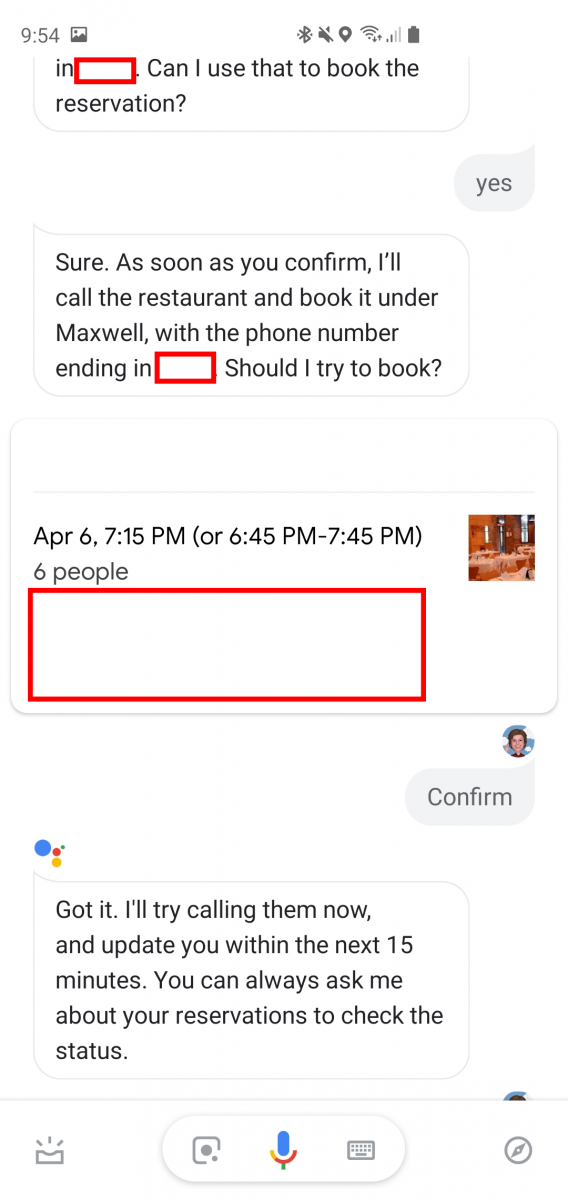
Last weekend, I needed to make a reservation at a local restaurant for dinner with my family this weekend. I usually use Google Assistant because it has OpenTable integration and that makes it super easy to set up a reservation. I wasn’t sure if this specific restaurant supported OpenTable (it doesn’t), but I tried Google Assistant anyway. Assistant went on to say it will call the restaurant for me and asked for the party size, date, and time. Once it did this, it said to wait 15 minutes and I will get a notification confirming my reservation. Under 6 minutes later, my reservation was confirmed.

Google Duplex really does make life easy for those who don’t have the time call to make a reservation or appointment yourself. It takes under a minute and Google handles the rest for you. The limited roll out at first really didn’t help it gain the attention it deserves, but now that it’s more widely available, it should be getting used more and more.

The post Google Duplex starts rolling out in the US for non-Pixel phones like the Samsung Galaxy S10 appeared first on xda-developers.

[Update: It’s Dead] Google will discontinue Inbox by Gmail in March

Update 4/2/19 @ 1:44 PM ET: Inbox by Gmail officially shuts down today. Many people have already noticed that the Android app no longer lets them see their inbox. More details below; the original article follows.

Inbox by Gmail has always been Google’s more daring and experimental email app. While Gmail has stayed largely the same over the years, Inbox was full of fresh and exciting features. However, recently, Gmail has been getting some of those features, which has led many to believe Inbox was on the way out. Google is announcing that Inbox will be discontinued by the end of March 2019 (via FastCompany).

Last time Google talked about Inbox the future was not nearly as bleak. This is what they had to say after the big Gmail redesign: “With respect to the upcoming Gmail announcement, there are no changes to Inbox by Gmail. It remains a great product for users with specific workflows and one in which we test innovative features for email.” That last bit is the most telling of what Inbox was really for. Google used it to beta test features before rolling them out to Gmail. Apparently, the beta test is over.

Google is, of course, no stranger to discontinuing apps and services. Inbox by Gmail users will not be happy about this news, but Gmail has been slowly adopting many of Inbox’s features. If you’ve been using Inbox for the last several years, you may be surprised at how much Gmail has changed. Still, it was nice to have an official alternative for those who didn’t like Gmail. Now those users will have to find a new email app to use.

Update: Inbox is Dead

Today marks the death of both Google+ and Inbox. The former is still available for G Suite customers while the latter will no longer be available for anyone. If you open the Inbox app, it’ll tell you to switch to Gmail. While there’s a trick you can use to bypass this warning, we recommend switching to an alternative email client like the newly released Spark app.

The post [Update: It’s Dead] Google will discontinue Inbox by Gmail in March appeared first on xda-developers.
[Update 3: It’s Dead] Google+ is shutting down for consumers after potential major data breach

Update 3: 4/2/19: He’s dead, Jim. Today, Google+ officially shut down for consumers. Rest in peace.

Update 2: 1/30/19: Google has finally given a solid end date for their social media service. It will shut down for consumers on April 2nd. Some features will begin shutting down next month. More information below.

Update 1: 12/10/18: Google has announced that the service will be shutting down early. More details below.

Google+ was introduced in 2011 as the tech giant’s response to the rising social network phenomenon and as a rival to Facebook, Twitter, and other social networks. Unfortunately, though, it failed to gain traction despite Google’s unmeasurable efforts and backing to bring it up and boost its adoption. Today, after over 7 years of existence, Google is shutting down Google+ for good–although its low user base surprisingly wasn’t the main factor behind this decision.

Today, Google posted information about Project Strobe on their blog. Project Strobe isn’t a piece of hardware or a service/product, but simply an effort to review and further strengthen privacy and security across all of their products, including their third-party APIs, services, Android, and more. One of the findings that stemmed from Project Strobe was that the consumer version of Google+ was no longer worth maintaining.

The detonating factor behind its demise? A bug in their Google+ People APIs, which potentially exposed the data of over 500.000 users and was promptly patched in March 2018. This, combined with the community’s extremely low user base—90% of Google+ sessions are under 5 seconds–were enough for Google to be done with it for good.

This wind-down isn’t becoming effective immediately. Instead, in order to give people a full opportunity for transitioning, the social network will be shut down over the course of 10 months. The process is slated for completion by August 2019. Google does not have a replacement for Google+ in mind, at least for now. While the consumer version will be closed down, the social network itself will be tilted towards enterprises rather than just consumers, just like they’re doing with Hangouts.

I was never an active user of Google+, but it will be interesting to see where Google will be heading with this. The company will be providing further information on the network’s future as well as steps to be taken by Google+ users in the next few months. As of now, though, we’d recommend checking out the full Project Strobe blog post to see more information about this decision.

Update 1: The Shutdown Has Been Accelerated

After another data leak, Google is shutting down the service four months early in April. The new API bug (which was fixed within a week) impacted 52.5 million users, who could have had personal profile information exposed to developers.

Update 2: The End is Near

In a support page, Google has outlined the timeline for shutting down Google+. Creating new pages and profiles will no longer be possible as early as February 4th. Community owners can begin downloading data in March. Sign-in buttons will be replaced with Google sign-in buttons in the coming weeks. Comments on other websites, such as Blogger, will be removed by March 7th. On April 2nd, accounts and pages will be shut down and content deleted. G Suite users will be unaffected.

Update 3: Google+ is dead

Google+ is no longer available for consumers or brand accounts. The company is in the process of deleting content from consumer accounts and pages, but it’ll take them months to do so. In the meantime, you may still be able to archive your remaining content before it’s deleted. Google+ for G Suite customers will still be supported. More details on the shutdown can be found here. RIP.

The post [Update 3: It’s Dead] Google+ is shutting down for consumers after potential major data breach appeared first on xda-developers.

Popular iOS email app Spark now available for Android

Today marks the passing of Inbox by Gmail, an alternative email client by Google that packed a bunch of features like message grouping and reminders, and that, despite not receiving as much love as other Google apps, still holds a dear place in the heart of many users. This is because of the main Gmail app not yet having the same feature set as Inbox–despite Google testing these features on Gmail and further promising they will come–making the transition from Inbox to Gmail an uncomfortable downgrade in many different aspects. Furthermore, there aren’t really any email clients good enough to tide you over, but this depends on who you ask. If you’re ready to let go, you might want to try other alternatives, like Spark, before hopping onto plain boring Gmail.

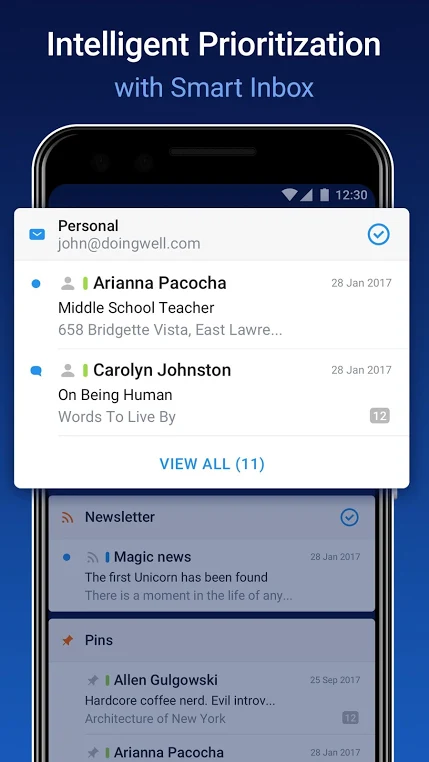
Spark is a critically acclaimed email client that has been available on iOS for a while. It includes several features such as smart notifications, snoozing, send later, reminders, quick replies, and much more. With the downfall of Inbox, it’s now becoming available for Android as well. In its current version, there is a couple of missing features, such as quick replies and 3rd party integrations, but these are set to ship in future versions very, very soon.

Letting go of Inbox may be hard–we’ve published a tutorial for you to try to keep using it after today in case you’re not ready to let go. But it’s something that you’ll have to do sooner or later, and it’s always good to search for alternatives if you don’t want to settle with Gmail. Spark is not identical to Inbox, mind you, but it does have a solid list of features you might miss from Inbox, such as reminders, and it’s quite possibly one of the best alternatives out there. Check it out now!

Spark – Email App by Readdle (Free, Google Play) →


Source: Spark

The post Popular iOS email app Spark now available for Android appeared first on xda-developers.