Monday, April 1, 2019

Pixel Stand can now be used with custom ROMs on the Pixel 3 and Pixel 3 XL

Giuseppe Maggio, more commonly known as Jertlok, has followed up on his reverse-engineering of Active Edge by bringing Google’s Pixel Stand functionality to custom ROMs. Owners of the Pixel 3 (Blueline) and Pixel 3 XL (Crosshatch) who also have a Pixel Stand no longer need to hold off on using custom ROMs because they can’t enjoy basically turning their phones into Google Home Hubs while they charge. They can get all the benefits of Google Assistant and seeing their Google Photos on the Ambient Display by downloading Dirty Unicorns builds right now (the Blueline one is currently under the RC tab while the Crosshatch one is under Weeklies) to try it out. Meanwhile, developers of other custom ROMs can cherry-pick the commits (while giving proper attribution of course) from the Dirty Unicorns Gerrit.

Remarkably, Jertlok reverse-engineered Google’s proprietary Pixel Stand functionality without actually owning a Pixel 3, Pixel 3 XL, or a Pixel Stand. Despite having developed “blindly” as the lingo goes, the code he developed was merged into the Dirty Unicorns repo and has already been released in a weekly build. This means that the code is stable and was deemed worthy of public release by the notoriously stringent quality-control standards of the DU team. It’s just unfortunate that said team is breaking up when the Android Pie era runs its course. Hopefully, Jertlok will still be finding ways to bring Google’s best Pixel-specific features to custom ROMs during the Android Q (Quiche?) era.


Source: Jertlok (Twitter) Via: PiunikaWeb

The post Pixel Stand can now be used with custom ROMs on the Pixel 3 and Pixel 3 XL appeared first on xda-developers.


SQLite Database Editor is a free Android app to read and edit SQL databases

There are many reasons why you might want to read or edit an SQL database, but normally you have to go through this process on a computer. While this is the most logical and comfortable option, sometimes you’re in a hurry or, for whatever reason, you don’t have access to one. If you need to quickly check one out, there are options to do it right from your phone. One of those options is SQLite Database Editor. The concept is simple: the app allows you to read and edit SQL databases right from your phone, and if you’re a root user, you can even modify databases in the system memory, including app databases and more.

It’s available in our forums and it’s developed by XDA Junior Member supertommino. Check it out now!

Check out SQLite Database in the Apps and Games forum

The post SQLite Database Editor is a free Android app to read and edit SQL databases appeared first on xda-developers.

Dive into Data with this Microsoft & Oracle SQL Certification Training, Now $39

From finance to healthcare, every multinational corporation now uses big data to make decisions. As such, data experts are in demand. If you want to build a number-crunching career, the Complete Microsoft & Oracle SQL Certification Bundle is the ideal starting place. This huge collection contains 11 courses, helping you master the platforms used by data professionals. You can get the bundle now for just $39 at the XDA Developers Depot.

You don’t need a degree in math or computer science to build a career in data. However, it is important to have a working knowledge of the tools used in enterprise setups, along with some key certifications.

This bundle covers Oracle 12c Database and Microsoft’s SQL Server in depth. Through hands-on video lessons, you discover how to install and maintain the two systems. The courses also show you how to code custom databases, backup your data,  automate tasks and run complex analysis.

In addition, every course in this bundle works toward preparing you for official exams. You get full exam prep and unlimited access to all the content. The training is worth $3,289, but you can get it now for $39.

 
The Complete Microsoft & Oracle SQL Certification Bundle – $39

See Deal

Like this deal? Check out Vault, the best way to secure your online data for just $9.99/mo.

The post Dive into Data with this Microsoft & Oracle SQL Certification Training, Now $39 appeared first on xda-developers.

The 5G Samsung Galaxy S10 launches in South Korea this week

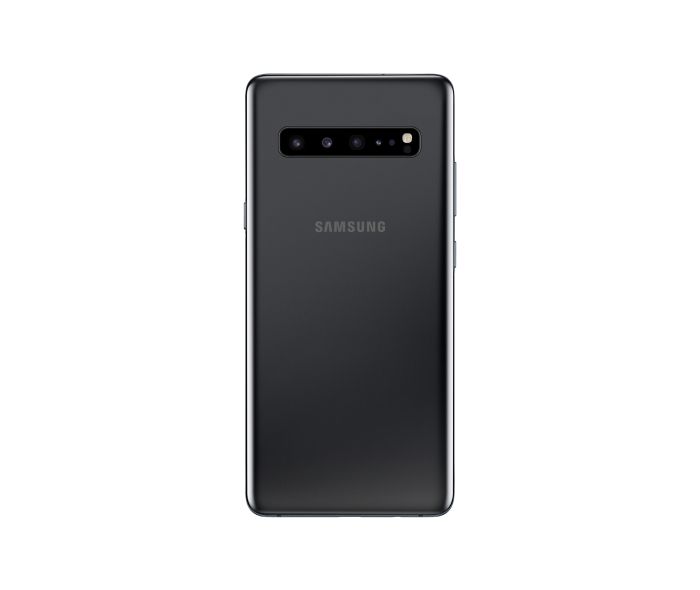
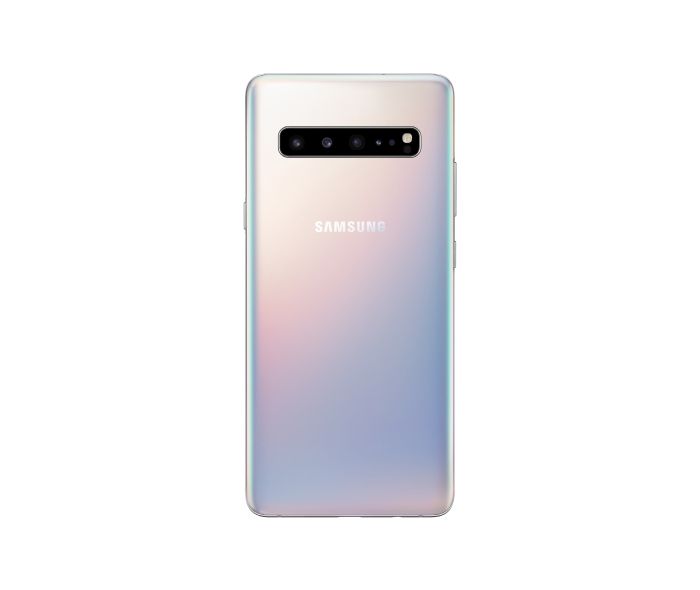
Samsung has taken a lead over other smartphone manufacturers and launched the first commercial 5G smartphone. In a press note, the Korean giant confirmed earlier reports of the Samsung Galaxy S10 5G launching this month and announced that the smartphone will be available in South Korea starting this Friday i.e April 5. The 5G variant of Galaxy S10 is the largest among its siblings and Samsung will not refrain from charging the Koreans for the luxury this smartphone will offer.

Being the first smartphone to harness the power of 5G, the Galaxy S10 5G will be powered by Exynos 9820 using an Exynos Modem 5100. The chipset is paired with an 8GB of RAM and Samsung will allow buyers to choose between 256GB and 512GB options for storage. The Verizon-exclusive Galaxy S10 5G, tipped to arrive in the U.S. in June, will be powered by a Snapdragon 855 chipset.

Featuring a 6.7-inch edge-to-edge Quad HD+ “Curved Dynamic” AMOLED display, the Galaxy S10 5G is even larger than the Galaxy S10+. The majestic display will provide for a highly immersive experience while consuming video content and playing games and this beautiful display will be complemented by striking colors such as Majestic Black, Royal Gold, Crown Silver.

samsung galaxy s10 5g samsung galaxy s10 5g samsung galaxy s10 5g

For photography, the Galaxy S10 5G has an extra camera compared to the Galaxy S10+, adding up to a total of six cameras. The smartphone is equipped with 3D depth sensors on both sides. Apart from accurately predicting the distance between the smartphone and any object for bokeh images and videos, the 3D depth sensor will also able to measure objects physically using Quick Measure.

To provide adequate power for the demanding multimedia experience, Samsung has built a 4500mAh battery into the Galaxy S10 5G with support for fast charging at 25W. For the performance of 5G, Samsung says that the smartphone will provide for download speeds up to  2Gbps such that users will be able to enjoy immersive AR and VR experiences without any lag and download entire seasons of their favorite TV series in a few minutes. That claim is what most reviewers and users will be interested in testing.

In South Korea, the Samsung Galaxy S10 5G will be starting at a price of at 1,397,000 won (~$1,230) for the 256GB variant. The pricing in other markets, including the U.S., is yet to be announced.

Korean telecom operators LG Uplus, KT, and SK Telecom, are offering several freebies such as VR headsets, wireless vacuum cleaners, Samsung TVs, free lunches and whatnot, hoping to grab the maximum share of subscribers upgrading to 5G. While 5G services were earlier supposed to arrive in March earlier, the rollout has been delayed until later this year due to lack of readiness of the telcos. Meanwhile, LG will also be launching its 5G-compatible LG V50 ThinQ in Korea later this month for a price tag of 1,199,000 won (~$1,055).

The post The 5G Samsung Galaxy S10 launches in South Korea this week appeared first on xda-developers.

Developer boots Windows 10 on ARM on the OnePlus 6T

Back in 2017, when Microsoft introduced a version of Windows 10 on devices powered by ARM chips, it sparked hopes about the potential of always-connected Windows laptops. Since then, Microsoft and Qualcomm have been collectively vouching for the game-changing benefits of these always-connected PCs. In October last year, the software giant also announced an SDK allowing developers to port their x86 apps for ARM64 chips. But little did we know that some developers would be a step ahead of Microsoft in terms of reaping the benefits of Windows 10 on ARM processors.

Bas Timmer, a software developer from the Netherlands, who goes by the alias NTAuthority has been fiddling with the ARM64 build of Windows 10 on devices with much smaller displays than typical always-connected Windows laptops like the Snapdragon 850-powered the Samsung Galaxy BOOK2 or the Lenovo Yoga 630 WOS. Lately, Timmer has been experimenting with Windows 10 on Android smartphones like the Google Pixel 3XL and their latest experiment was on a OnePlus 6T.

Besides booting Windows 10 on a OnePlus 6T, Timmer also managed to run into a blue screen of death (BSOD) error. Timmer shared no instructions about how to get your own “OnePlus 6T 🙁 Edition”, so it can be expected that trying to get your Android smartphone running on Windows might not be a very gratifying experience.
The developer also noted that getting touch working on the OnePlus 6T will be fairly easy since the Samsung’s Super AMOLED display the 6T uses a Synaptics touchscreen controller. This is perhaps because many Windows laptops use trackpads developed by Synaptics. While Timmer did not share any glimpse of the Windows 10 desktop GUI, the idea of Windows running on a smartphone is utterly intriguing for anyone who cared about either Android smartphones or Windows or both. And the fact that that most of us would not want to use it on a daily basis does not make it any less exciting.

Lastly, we hope to many more Android devices running on Windows, courtesy of NTAuthority. If you have any special requests, you may try commenting on their tweets or reach out to them via any of their contact points listed on their website. As for the future of the always-connected laptops lies, we can expect 5G to propel their adoption. In the meantime, we also hope for such laptops to become capable of running power-hungry applications like photo and video editing or music composing.

The post Developer boots Windows 10 on ARM on the OnePlus 6T appeared first on xda-developers.

MIUI 10 Global Beta 9.3.28 brings April 2019’s Security Patches and System-wide Dark Mode to some devices

MIUI is Xiaomi’s take on customizing Android for their devices, adding on several new features on top of stock Android, to the point that you cannot often immediately recognise the base Android version on a Xiaomi device. Xiaomi runs a continuous public Beta channel for several of its devices, giving the community a chance to try out new features before they can make their way over to the Stable channel. The latest MIUI 10 Global Beta 9.3.28 brings over April 2019’s security patches and system-wide dark mode to some of the supported devices.

The official changelog posted in MIUI forums is as below:

  • Add Dark mode:
    After opening, the system interface and some applications will use dark color as the main color.
    Go to Settings -> Display -> Dark Mode
  • Updated Android Security Patch (March 2019)
    Increased system security.
  • Virus scan started over after users tapped the results of a completed scan.
  • Battery indicator didn’t disappear when the Notification shade was opened on the Lock screen.
  • Adding passwords while transparent wallpapers are applied.
  • Issues with displaying notifications on the Lock screen.
  • Errors occurred while entering passwords and PINs.

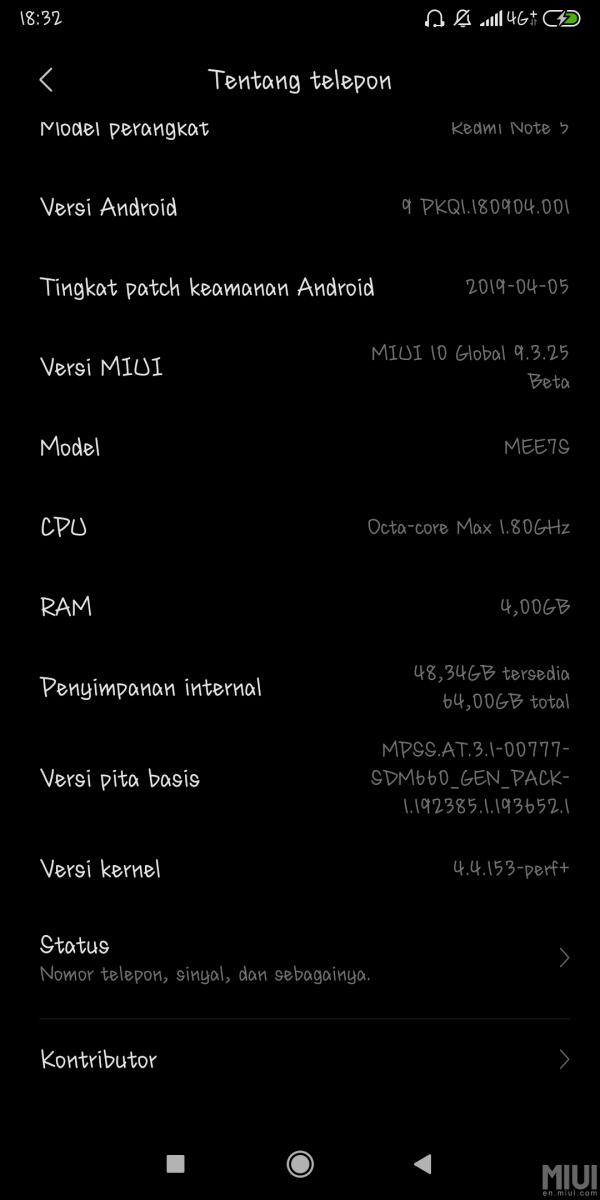
However, based on the user feedback received so far, the official changelog appears to be incorrect in a few places. For instance, dark mode is not available across all devices: it continues to remain absent for the Poco F1, while users on the Xiaomi Redmi Note 5 Global and Xiaomi Mi 8 report that dark mode is present.

Further, the official changelog mentions March 2019’s security patches, but the About Phone screen from a few devices show that the phone is on April 2019’s security patches. The Poco F1 and Mi 8 are reportedly on April 1, 2019’s security patch level, while the Redmi Note 5 Global has a patch level dated April 5, 2019. Google hasn’t yet detailed what is new in these security patches, but these patches are usually shared with OEMs beforehand in order to be incorporated within updates.

MIUI Member Ilovemi8 has posted a list of changes that they have found in the latest Beta for the Mi 8. Changes include updated security patch, system-wide dark mode, improved notification settings, new battery style indicator (grey – discharge, green – charging, blue – fast charging), and changeable notification styles. You can find screenshots of the new features in their post.

MIUI 10 Global Beta 9.3.28 is released for a whole host of devices as mentioned in the official announcement post. The update is not available for the Redmi Note 4X, Redmi Note 4 MediaTek, Redmi 5 Plus, Redmi S2 and Mi 9. The update marks the first set of releases for the Redmi Note 5 and Redmi Note 5 Pro on Android Pie, which we noted last week. As a side note, some users have reported that this Beta has issues with mounting the microSD card on the Redmi Note 5, so take adequate backups accordingly.

You can download the latest Beta for your device from the official downloads page.

We hope Xiaomi improves upon its changelogs to accurately reflect the incorporated changes on a per-device level.


Source: MIUI Forums

The post MIUI 10 Global Beta 9.3.28 brings April 2019’s Security Patches and System-wide Dark Mode to some devices appeared first on xda-developers.

Google Pixel’s Call Screen feature may come to Motorola and Nokia Android One phones

Call screen is one of the most useful applications of the Google Assistant. Activated by default on Google Pixel devices, Call Screen acts as a shield between you and annoying spammers. It uses Google Assistant to ask callers about their objective of calling and transcribes their response in real-time. With this, you can easily decide whether you must attend your caller or give them a cold shoulder. Using smart replies, Call Screen lets users ask follow-up questions from callers so as to effectively combat scammers, bots, and also helps in meetings and noisy environments.

Alas, Call Screen is a feature limited to the Google Pixel 3/3XL and older Pixel smartphones. But there is a possibility that it could soon be rolled out to Nokia and Motorola smartphones. The latest beta of the Google Phone app has hidden instances which point to Google’s testing of Call Screen on certain devices from Motorola and Nokia. These references of Call Screen were pulled up by Reddit user u/hkyq.

call screen google phone

Last year, HMD Global announced that all devices upwards of Nokia 2 will be launched under Android One, implying that they already have an edge over others in terms of receiving Google’s best applications of technology. Meanwhile, Motorola too announced Motorola One and Motorola One Power under Android One banner last year after betting on stock Android for its smartphones since the very first Moto G device. Thus, Android One smartphones are expected the earliest recipients of Call Screen if it extends to devices outside of Google’s own catalog.

It must be noted that Call Screen is currently available only for English-speaking users in the U.S. and was recently rolled out in Canada as part of a beta trial. By launching it on other devices, Google might be planning to target native English speakers in regions other than North America. Meanwhile, if you’re in Canada, you can sign up as beta tester for the Google Phone app and set Google Assistant’s default language to English (Canada) to screen you calls before you take them.

Phone (Free, Google Play) →


Source: Reddit user (u/khyq0)

The post Google Pixel’s Call Screen feature may come to Motorola and Nokia Android One phones appeared first on xda-developers.