Sunday, December 2, 2018

Are You Looking For Chance To Be On XDA TV?

Are you looking for a place to make cool videos about mobile technology?  The XDA TV YouTube channel is looking for one or two talented fans who are interested in making videos for the channel. Watch the video below to learn more from TK Bay about joining the XDA TV crew.

To be eligible, you need only a few things: A decent smartphone or camera to film with, the ability to record good audio and video and edit them in software, and a good environment to film in. If you are interested in joining the XDA TV crew, you can apply via the Google Form below. We’ll need to see a sample video, though, so we can get a sense of where you’re currently at in terms of video production skills. The sample needs to only be 30 seconds to 1 minute long. Each entry will be reviewed by us so we can pick the best creators.

We are just looking for one or two fans who are passionate about Android and modding your devices to join the team. You can check out our XDA TV channel below to see the type of content we currently post. If you think you can make it, take a shot at it and apply.

Google Form to apply for XDA TV

XDA TV Channel

Saturday, December 1, 2018

Honor Magic 2 update adds calorie and weight detection for foods in HiVision

Honor Magic 2 HiVision food

The Honor Magic 2 is a recently released smartphone with support for many of Huawei’s AI-powered features. From the bog standard camera features like scene detection to the more sophisticated live call translation, it’s a phone that aims to impress across the board. It even features a sliding camera, so that the front of the device is, pretty much, fully bezel-less. An update has just been released that adds new features to HiVision as first seen on the Huawei Mate 20, allowing you to point your camera at food to calculate roughly how many calories it has to varying degrees of success. The update will bring your device to version C00E131R1P19, and weighs in at roughly 591MB.

Unfortunately, it’s not exactly the most polished software and will sometimes fail inexplicably. It can identify some basic foods like tomatoes and oranges fine, however, it couldn’t even identify an onion as it thought that it was a dumpling. Breaded fish also was identified as BBQ chicken wings. It’s not that accurate and more of a software gimmick for now. There’s definitely potential for it being useful in the future, but for now, there’s not a lot of reason to use it regularly. HiVision is basically Huawei’s answer to Google Lens and comes as part of the larger HiAssistant package.

So, why would you want this feature? There isn’t a lot that it can do at the moment, and nearly all major information will be available on the packaging of what you’ve just bought. If you really are stuck and can’t find the packaging, simply Googling it should net you the answer a lot more consistently. It’s a feature that, with a lot of work, can be useful. That time isn’t necessarily now, and if it fails to identify even the most basic of food items then it’s unlikely to be useful for quite a while.

Note: Huawei has stopped providing bootloader unlock codes for their devices. Therefore, the bootloader of the Honor Magic 2 cannot be unlocked, which means that users cannot root or install custom ROMs.

[Discussion] What keyboard are you using on your Android phone?

keyboard discussion

Thanks to the open nature of Android, it’s extremely easy to go on the Google Play Store and pick out a keyboard of your liking for typing. While most keyboards are remarkably similar, you occasionally will get something a bit more unique included. The Google Keyboard (Gboard), for example, can translate into another language directly into the input box that you have selected. That’s not all either, as SwiftKey was just upgraded to support Bing searches, directly from the keyboard itself. The fact it’s Bing may be disappointing to some, but it makes sense given that Microsoft somewhat recently acquired SwiftKey. Still, it shows the potential greatness that keyboards can have.

I personally use Gboard for a number of reasons, some of which are for having fun with my friends rather than actual, useful features. Having the ability to translate from within the keyboard itself is great, and you can have a lot of stupid fun with it with friends who may speak other languages. The ability to send GIFs directly from the keyboard is great as well, and it also has a huge amount of customization options built-in. My girlfriend speaks Latvian, so having dual-language support in the form of English and Latvian is great too, just in case she needs to use my phone.

But what keyboard do you use? There are so many on the Google Play Store and many that may appeal to you for different reasons. There are a few cool conceptual designs around, and we even covered what we feel are some of the best keyboard apps around currently. But what’s your favorite? What do you use? Gboard is the basic one that comes on every Android smartphone nowadays, yet many may feel the need to switch to another for any number of reasons. Let us know in the comments below!

Franco Kernel now available for the Xiaomi POCO F1

Xiaomi Pocophone F1, Xiaomi Poco F1

The Xiaomi POCO F1 is quickly moving in to occupy the void left by the flagship killers moving to higher price brackets. The POCO F1 is reminiscent of the OnePlus One, bringing in flagship grade performance at affordable prices. While there are obviously a few shortcomings when compared to more expensive flagships, the aggressive pricing of the device makes these issues easier to ignore, especially if you are on a tight budget.

The POCO F1 is getting a lot of good attention from the developer community. There is already a wide variety of ROMs, kernels and other customizations like a Google Camera port and MultiROM available for the device. And now, you can add the popular FrancoKernel to the list of available third-party customizations.

XDA Recognized Developer franciscofranco‘s FrancoKernel is known for its stability and efficiency, and is used by thousands of people across a diverse group of devices. For the POCO F1, kernel builds starting with r1 work with MIUI and custom ROMs based on LineageOS. However, it is advised not to flash the kernel on top of Android Pie-based MIUI 10 Beta builds as WiFi functionality currently does not work on those ROMs.

Download FrancoKernel for the Xiaomi POCO F1

Visit our Xiaomi POCO F1 forums!

Substratum theme changes the color of the OnePlus 6T’s fingerprint animation

OnePlus 6T

The standout feature on the OnePlus 6T is its in-display fingerprint scanner. While not exactly superior over its predecessor in the current first-generation, in-display fingerprint scanners are the next step forward in smartphone innovation.

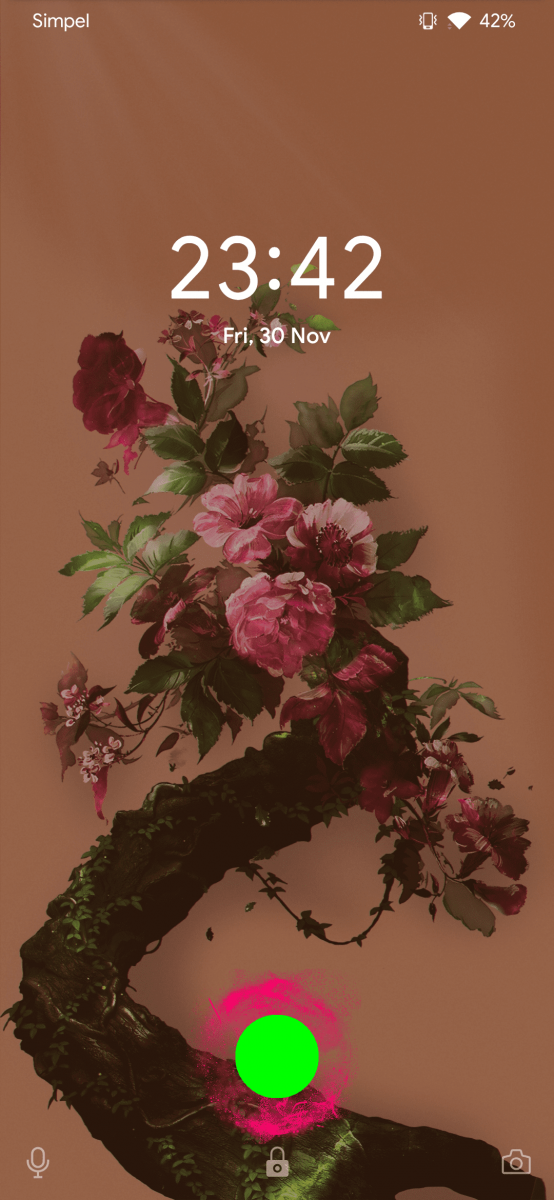
If you have the OnePlus 6T and are looking at customizing the animations and graphics of the fingerprint scanner, check out XDA Senior Member mingo_mgx‘s MGx FingerPrint Animation Changer. This is a Substratum theme for the OnePlus 6T that specifically changes the color of the fingerprint animation to Fuchsia Pink. To get this working, you’ll need to unlock the bootloader and root your device, for which we have a tutorial written up. This is unfortunately required since, as of the Android 9 Pie release, Substratum themes no longer work without root.

Since this is an initial release, there are limitations on what you can do right now. The green light that is present under the finger still remains, this theme changes the animation around the finger. The color is also hardcoded to Fuchsia Pink, though the developer promises to bring in more color options soon. The 6T has not been available for very long, but we hope to see more mods for the device in the coming weeks.

Download MGx FingerPrint Animation Changer

Check out the OnePlus 6T Forums!

Nokia 6.1 Plus forums are now open

Nokia 6.1 Plus android pie

HMD Global launched a phone called the Nokia X6 back in May of this year. Like other OEMs tend to do, they ended up rebranding the phone as the Nokia 6.1 Plus and launched it as an Android One phone a couple of months later. Just like the original, the Nokia 6.1 Plus comes with the Snapdragon 636 SoC, 4GB of RAM, 64GB of internal storage, and a 3,060mAh capacity battery. Since then, we have actually seen the smartphone receive a bit of attention with it receiving support for ARCore just three months ago.

Headlines for the Nokia 6.1 Plus weren’t all great though as news of it losing a feature spread throughout the Android community. The device had a feature that let you hide the notch (similarly to other phones) and many speculated that it was because the smartphone was part of the Android One program. We recently learned that this was not the case though and it regained that notch hiding feature earlier this month when it received an update to Android Pie.

Now those who own the device can discuss it within its own official XDA forum which was just recently opened.

Nokia 6.1 Plus XDA Forum

Google Photos is getting a new Express backup mode aimed at India

Google Photos express india

In a perfect world, everyone would have access to fast, reliable, and cheap unlimited mobile data. That’s not the world we live in, however, which means most people have to keep an eye on how much data they use. Google Photos is one app that can eat up a lot of data if you’re not careful. It can backup full resolution photos in the background, but a new option will allow users to limit the data usage with photo backups.

Raja Ayyagari, Product Manager of Google Photos, talked about an upcoming feature called “Express.” This will be a new option in the Backup settings. Express allows Photos to reduce file sizes so you at least have a compressed version of the photo backed up. Backups will be faster and not use as much data. Quality will obviously not be as good, but at least you will have the photo if you have a data loss.

To go along with the new Express option, Google Photos will get more fine tuning for how much data is used to back up photos. Users can restrict the data used to as low as 5MB. These new features will begin rolling out in India first and will eventually be available in other markets. Users in markets like India will appreciate these features, but they can be handy for people in all areas as well.

Google Photos (Free, Google Play) →


Source: 91mobiles